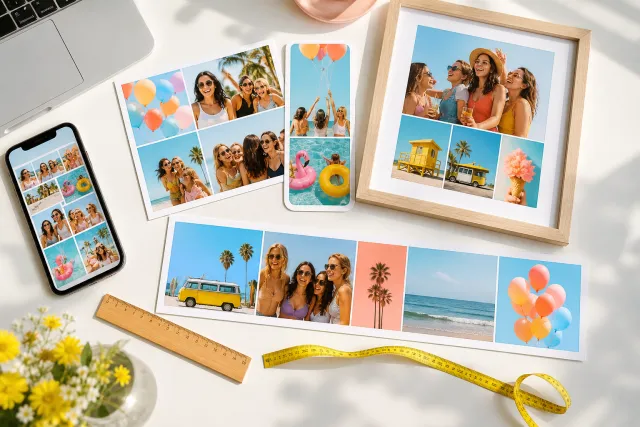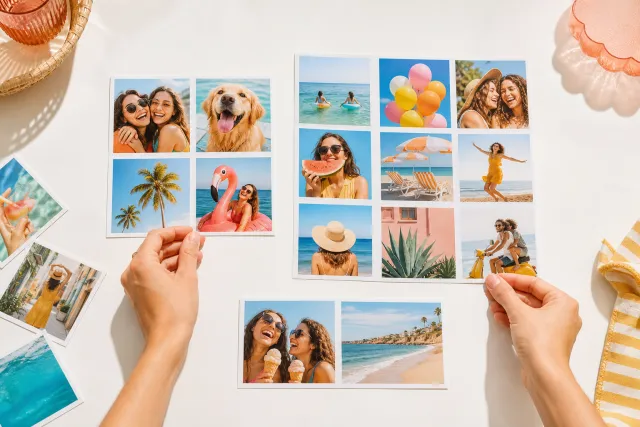
Six photo collages
Six is the most useful number on this site: enough photos to be a collection, few enough that a face is still a face on a phone.
Square post 1080x1080
Portrait post 1080x1350
Story 1080x1920
A4 print 2480x3508
Below six a collage is a statement about a handful of pictures. Above six it becomes a pattern, and the individual photographs stop being individually looked at. Six is where those two things meet, which is why more collages are made at this count than at any other, and why it is worth knowing exactly what it can and cannot carry.








Made with StudioCollage
Every collage below was made in the editor itself, at full resolution. Open one to start from it.
 Open in the editor
 Open in the editor
 Open in the editor
 Open in the editor
 Open in the editor
 Open in the editor
 Open in the editor
 Open in the editor
 Open in the editor
 Open in the editor
 Open in the editor
 Open in the editor
 Open in the editor
 Open in the editor
 Open in the editor
 Open in the editor
 Open in the editor
 Open in the editor
 Open in the editor
 Open in the editor
 Open in the editor
 Open in the editor
 Open in the editor
 Open in the editor
 Open in the editor
 Open in the editor
 Open in the editor
 Open in the editor
 Open in the editor
 Open in the editor
 Open in the editor
 Open in the editor
 Open in the editor
 Open in the editor
 Open in the editor
 Open in the editor
 Open in the editor
 Open in the editor
 Open in the editor
 Open in the editor
1. Three by two, or two by three
The first count with a genuine choice of grid, and the two are not the same picture turned sideways.
Three across, two down gives wide cells. It suits landscapes, groups and anything horizontal, and it reads as a strip of moments.
Two across, three down gives tall cells. It suits portraits and single figures, and it fills a story format without cropping.
The test is the photos, not the frame: six portraits in a 3x2 grid lose their tops and bottoms even though the grid fits the page perfectly. Match the cell shape to the pictures and let the outer format follow.
2. The last count that shows faces
On a phone screen, a collage is roughly 400 pixels wide. Divided into six cells, a face inside one is about the size of a thumbnail; divided into nine, it is a fingernail.
Six is the limit for people. If the photos have faces in them and the collage is for a phone, this is as far as it goes.
Above six, the subject has to be shape and colour: food, landscapes, patterns, a wall of moments where no individual one needs to be read.
This is the single most useful number on the page and it is why almost every template here offers a six cell version.
3. Six is enough to need variety
At three or four photos, similar pictures still read as a set. At six, sameness becomes visible: six photos taken from the same distance in the same light look like a contact sheet.
Mix the distances. One wide, one close, four in between. It is the cheapest improvement available at this count.
Break up similar colours. Two photos of the same green field should not share an edge.
One photo can be imperfect. At six cells a slightly blurred or dark photo adds texture rather than dragging the collage down, which is not true at two or three.
4. Make one
Pick a collage above and it opens ready. Choose the grid from the shape of your photos rather than from the shape of the page: that decision does more than anything else at this count.
How many photos covers the trade-off, and nine photos is the next step up if the collage is going to be printed.
Questions about 6 photos collages
Should I use a 3x2 or 2x3 grid for six photos?
Choose from the photos, not the page. Three across and two down gives wide cells and suits landscapes and groups; two across and three down gives tall cells and suits portraits and story formats. Six portraits in a 3x2 grid lose their tops and bottoms even though the grid fits the page perfectly.
Is six photos too many for a phone?
It is the limit for people. On a roughly 400 pixel wide screen, a face in one of six cells is about the size of a thumbnail; in one of nine it is a fingernail. Above six, the subject has to be shape and colour - food, landscapes, patterns - rather than expressions.
How do I stop six photos looking like a contact sheet?
Mix the distances: one wide, one close, four in between. At three or four photos similar pictures still read as a set, but at six the sameness becomes visible. Also avoid putting two photos of the same colour next to each other.
Can one of the six photos be poor?
Yes, and it often helps. At six cells a slightly dark or blurred photo adds texture rather than dragging the collage down, which is not true at two or three where it would be a third or a half of the picture.