Baby's first year photo collage: the 12-month grid, step by step
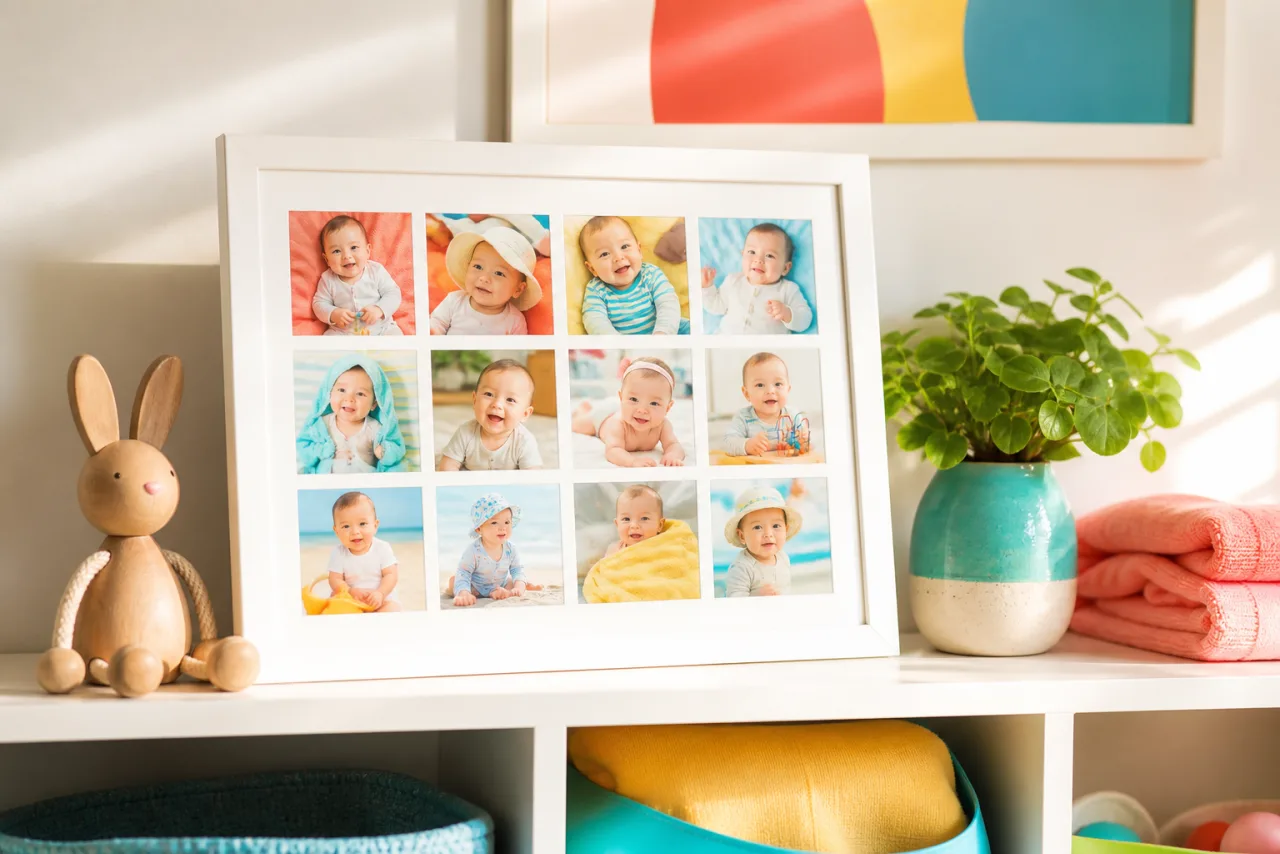
Twelve photos, one per month, in one grid: the first-year collage is the most made and the most purchased baby keepsake, which is why the search results are all frames and paid templates. You need neither. Here is how to shoot the monthly photo so the grid lines up, the layouts that work, and how to build it free and print it.
1. Shoot the monthly photo so the grid lines up
The grid looks designed when the twelve photos match. Decide the setup at month one and keep it for a year:
- Same place. The same chair, blanket or crib, against the same wall. A plain background makes the baby the only thing that changes.
- Same framing. Shoot from the same distance and height, baby centered, with room around: the baby grows, the frame should not need to. Portrait orientation fits both 4x3 and 3x4 grids after a square crop.
- Same light. Daylight from the same window, at the same time of day. No flash.
- Same day of the month, or close. The monthly rhythm is the point.
- Shoot ten, keep one. Babies move. Take a burst and pick the frame with the eyes open and the face toward the camera.
If the year has already happened and the photos are all different, pick twelve with a similar feel (all close-ups, all in daylight) and let the grid do the rest. Auto collage can help here: it keeps faces whole and centers them, so twelve uneven photos still line up by the eyes.
2. The grid and its variants












The 4x3 grid of twelve, and a hero-over-a-row layout for a post that shows the cake big and a few months small.
- The 4x3 grid. Twelve equal cells, month one top left, month twelve bottom right. The reference. Landscape frame, wide wall, Facebook cover of the first birthday.
- The 3x4 grid. Same twelve, three across. Portrait frame, Instagram 4:5 post, a story at 9:16 with a caption band.
- Newborn plus twelve. The birth photo in a large cell on the left or on top, the twelve months in a grid beside or below it. Thirteen photos, the most popular variant for a gift print.
- The first birthday hero. The cake-smash photo big, the twelve months in a strip of small cells along the bottom. A poster for the party at 16 x 20 or larger.
- Four seasons. Not twelve but four, one per season, in a 2x2 grid. Quicker, and the change between cells is bigger.
- Two rows of six. A wide strip for a shelf or a desk, 6x2, printed on a panoramic format.
Let Auto lay them out, then fix what you want.
Free, no watermark, and your photos stay on your device.
Open StudioCollage3. Month labels, or none
Labels are optional. A grid in order reads by itself, and many people prefer it clean. If you want them:
- A number in a corner of each cell, same corner, same small font, white with a thin outline or a tiny box. "1" to "12", or "1 mo" to "12 mo".
- A title cell instead of labels: replace one cell (or add a bottom band) with the baby's name and the year, in one font, and leave the photos bare.
- Never on the face. The label goes on the blanket, the wall, the corner.
Fonts, outline and size are in how to add text to a photo collage. For a nursery, a rounded sans-serif reads warm without being cute.
4. Sizes: a print, a post, a card
| Destination | Size | Grid | Cell size |
|---|---|---|---|
| Frame on a shelf, 8 x 10 | 2400 x 3000 | 3x4 | about 2.7 x 2.5 in |
| Wall, 11 x 14 | 3300 x 4200 | 3x4 | about 3.6 x 3.5 in |
| Wall, 16 x 20 | 4800 x 6000 | 3x4 or newborn plus twelve | about 5 x 5 in |
| Instagram or Facebook post | 1080 x 1350 | 3x4 | about 355 px |
| Story | 1080 x 1920 | 3x4 with a title band | about 355 px |
| First birthday card, 5 x 7 | 1500 x 2100 | 4 seasons or hero plus strip | varies |
On a phone screen, twelve cells of 355 pixels are the limit for faces: fine for a baby's face filling the cell, too small if the baby is a small part of a wide photo. Crop tight in each cell. How many photos to put in a collage explains the cell-size rule; how to print a photo collage covers resolution and margins for the frame.
5. Make it free, then print it
- Open StudioCollage and choose the destination: 8 x 10 print, 11 x 14, or the Instagram post.
- Add the twelve photos in order. Choose the 4x3 or 3x4 grid, or press Auto and pick the proposal that keeps every face centered.
- Reframe each cell so the face sits at the same place in all twelve: eyes on the same line makes the grid.
- Set a thin white gap (or none for a seamless block), and a background color taken from the blanket if you want a tinted border.
- Add month numbers or a title cell, or neither.
- Download as PNG at 300 DPI for the print, or JPG for the post. Order the print at the exact size you designed, or print it at home on photo paper.
The family templates include the twelve-cell grids; the project stays saved in your browser, so month twelve can be added to a grid started in month one.
6. After the first year
- Year two in four. The monthly rhythm loosens; a 2x2 of the seasons keeps the tradition without the chore.
- Same chair, every birthday. One photo per year in the same spot, in a row of columns. At five years old, five cells; at ten, a 5x2 grid. The birthday collage ideas have the variants.
- Siblings side by side. The first-year grid of each child, two grids in one print, for the day they ask who was the chubbier baby.
Frequently asked questions
How do I make a baby's first year collage?
Take one photo a month in the same spot, same light and same framing, then put the twelve in a 4x3 or 3x4 grid in order, month one top left. A free collage maker such as StudioCollage has the 12-cell grid and print sizes; add the month numbers if you want them and download at 300 DPI for a frame.
What size should a 12-month collage be?
8 x 10 inches (2400 x 3000 pixels) for a frame on a shelf, 11 x 14 (3300 x 4200) or 16 x 20 (4800 x 6000) for a wall. For a post, 1080 x 1350 in a 3x4 grid. Each cell stays above 2 inches on the 8 x 10, which is enough for a face.
Should the grid be 4x3 or 3x4?
4x3 (four columns, three rows) suits a landscape frame and a wide wall; 3x4 suits a portrait frame and an Instagram 4:5 post. Both read month by month in rows, left to right.
What if I missed a month?
Use the closest photo you have in the same setting, or make it a 12-cell grid where one cell holds the birthday cake instead. Nobody counts; the consistency of the other eleven carries the grid.
Can I add the newborn photo?
Yes: a 13th cell. Put the newborn photo big on the left with the twelve months in a 4x3 grid beside it, or use a 13-cell layout with the birth photo in the center. A hero-and-grid layout is the most popular variant.