Photo grid, collage, montage or mosaic: what the words actually mean
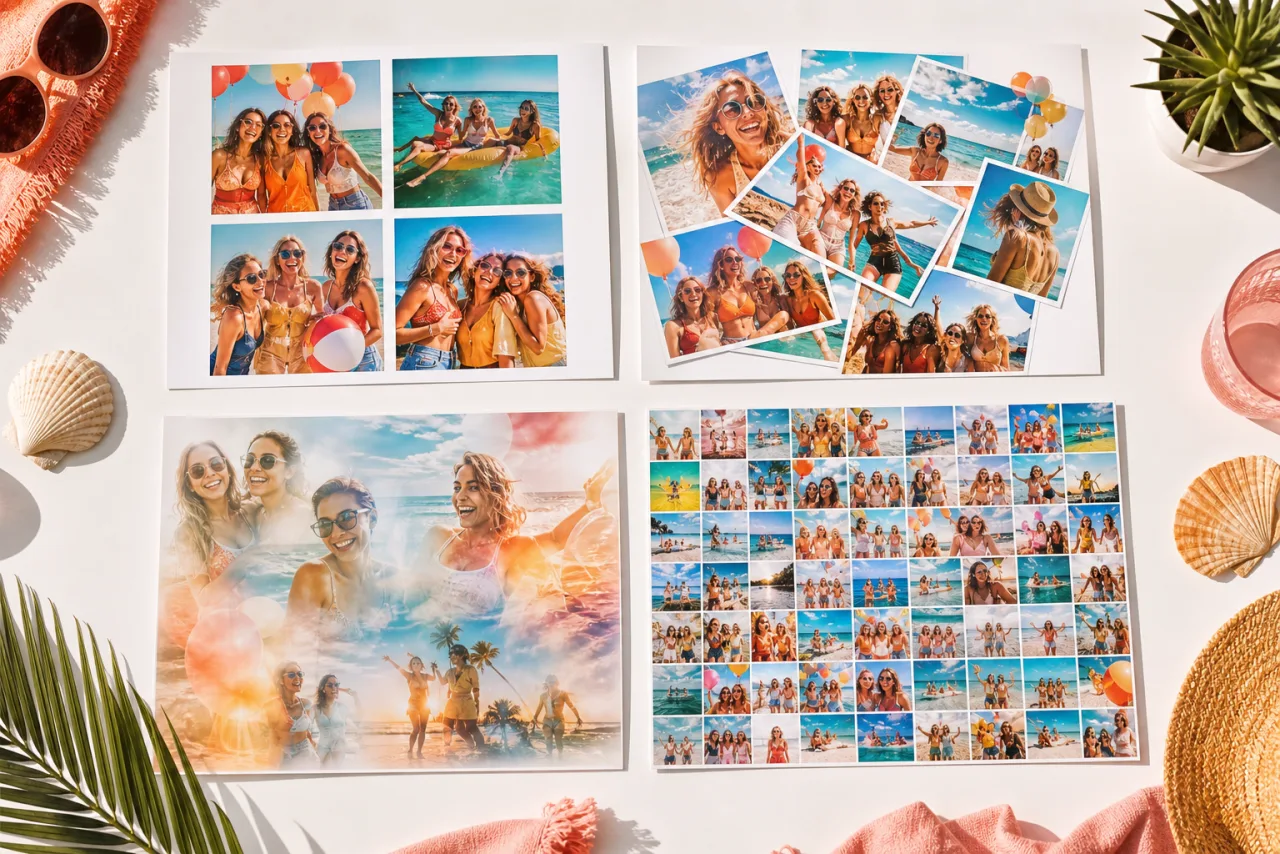
Grid, collage, montage and mosaic get used as if they were the same word, and mostly nobody minds. They do mean different things, though, and the differences are useful: they tell you what layout to reach for and what result to expect. Here is each one in a sentence, the table that separates them, and the honest note that the words overlap more in everyday use than any dictionary admits.
1. The short answer
| Word | What it means | Cells | Best for |
|---|---|---|---|
| Photo grid | Several photos in aligned cells of equal size | Equal, aligned, no overlap | Feeds, prints, anything read quickly |
| Collage | Several photos arranged together, joins visible | Any size, may overlap or tilt | Mixed shapes, scrapbook feeling |
| Montage | Images blended into one another, seams hidden | None, the edges are faded | One combined image, dreamlike effect |
| Mosaic | One big image built from many tiny ones | Hundreds, used as pixels | Posters, gifts, a lot of source photos |
If you only remember one line: a grid is the tidy case of a collage, a montage hides its joins, and a mosaic uses photos as pixels.
2. The photo grid
Equal cells, aligned, evenly spaced. Two by two, three by three, four by three. Nothing overlaps and nothing is tilted.
Its strength is speed, in both directions: fast to make, fast to read. At the size a photo appears in a feed, a grid is legible where a busier arrangement turns to noise. It is also the layout that prints best, because straight edges survive being trimmed.
Its weakness is exactly the thing that makes it tidy: equal cells crop unequal photos. If your shots are a mix of tall and wide, see collage with photos of different sizes.








A four cell grid and a nine cell grid. The nine cell version needs bigger faces or a bigger print; see how many photos to use.
Let Auto lay them out, then fix what you want.
Free, no watermark, and your photos stay on your device.
Open StudioCollage3. The collage
The general case, and the oldest of the four words: from the French coller, to glue. Pieces put together on one surface, and you can see they are pieces.
A collage allows what a grid forbids: cells of different sizes, photos that overlap, small rotations, gaps left on purpose. That freedom is what makes it right for a mixed camera roll and for anything meant to feel handmade rather than designed.
It is worth saying plainly that in everyday use, and in every app including ours, collage has swallowed grid. When someone says collage maker they usually mean a tool that also makes grids. Nobody is wrong about this; the word simply widened.


Two collages that are not grids: one hero with supporting cells, and uneven cells throughout.
4. The montage
Images blended into one another so the boundaries disappear. Two portraits fading into each other, a face emerging from a landscape, a double exposure.
The distinguishing test is simple: in a collage you can point to where one photo ends and the next begins. In a montage you cannot, because the edges have been faded, masked or blended away.
The word carries a second meaning from film, where a montage is a sequence of shots compressed into a short passage of time. That is why searching for the word turns up video editors as often as photo tools.
StudioCollage does not make montages: it keeps the joins visible on purpose, because that is what a collage is. For blending you want an image editor with layer masks.
5. The mosaic
One large image, built out of hundreds or thousands of small photographs used as pixels. Look closely and you see individual pictures; step back and you see a portrait.
It needs three things a collage does not: a large source library, usually several hundred images, a target image with strong contrast, and a big print. On a phone screen a mosaic reads as a slightly odd photograph and the whole effect is lost.
The word is also used loosely for any collage with uneven small cells, which is how our own mosaic layout got its name. Both uses are current; the context makes it clear which one is meant.
6. Which one to make
- Going in a feed or a story? Grid. It survives being seen at thumbnail size on a phone.
- Photos of very different shapes? Collage with uneven cells. Forcing them into a grid is what causes cropped foreheads.
- Printing it and hanging it? Either, but a grid trims cleanly and a free collage does not.
- Want the arrangement itself to be the thing? Montage or mosaic, and expect it to take real time.
- Not sure? Grid. It is the layout you least often regret.
7. Make it
Open StudioCollage and pick the destination first, then choose a grid layout or one with uneven cells depending on which of the above you are after. If you cannot decide, add the photos and press Auto: it proposes several arrangements from the same set, and seeing them side by side settles the question faster than reading about it.
Next: fifty ideas with their layouts and every size in pixels.
Frequently asked questions
What is the difference between a collage and a photo grid?
A grid is a collage with rules: every cell is the same shape and they line up. A collage is the wider family, and it allows cells of different sizes, overlaps, tilts and gaps. Every grid is a collage; most collages are not grids.
Is a montage the same as a collage?
Not quite. A montage blends its images into one another so the seams disappear, which is why the word is also used for a sequence of shots in film. A collage keeps its images separate and lets you see the joins. If you can point at where one photo ends, it is a collage.
What is a photo mosaic?
A big picture made of hundreds of tiny photos, where the small ones act as pixels. Stand close and you see the individual photos; stand back and you see a single face or logo. It is a different craft from a collage, and it needs a lot of source images.
Which one should I make?
A grid nine times out of ten: it is fast, it reads well at small sizes, and it never looks messy. Choose a free collage when your photos are different shapes and you want that to show. Montages and mosaics are for when the arrangement itself is the point.
Does the word matter for finding templates?
A little. Tools use the words loosely, so searching for collage will show you grids, and searching for grid will rarely show you overlapping layouts. If you want overlaps and tilts, look for the word freestyle or scrapbook rather than grid.